





SOLsearcher Cloud (SSC)
Produced by Solimar Systems
SOLsearcher™ Cloud (SSC) provides a rapid, easy-to-deploy Microsoft® Azure® cloud architecture optimized specifically for digital workflows and eDelivery, replacing legacy software with a scalable solution built for your cloud initiatives.
The Future of Electronic Document Delivery
SOLsearcher™ Cloud (SSC) is our enterprise-class eDelivery and archive solution built for the Microsoft® Azure® cloud ecosystem. It is designed to augment or replace traditional printing processes by providing a highly secure, intuitive platform for distributing and accessing critical transactional information via web browsers. Whether you are a commercial print service provider hosting multiple clients or an enterprise streamlining internal workflows, SSC provides rapid deployment, comprehensive search capabilities, and robust API integration.
Key Benefits
Cost-Effective Delivery: Significantly lowers the cost of delivering transactional reports, including consumer communication and internal corporate data.
Rapid Search and Retrieval: Provides an electronic repository that enables fast online search and retrieval for customer service and end users.
Scalability & Performance: Features a highly scalable “N-tiered” architecture that expands and contracts in real-time based on workload, ensuring you only pay for the resources you use.
Simplified PDF Archiving: Ingests finalized PDF outputs from existing Solimar® Print Director™ Enterprise (SPDE) and iCONVERT™ systems, allowing secure storage and presentment of digital documents once the production print phase is complete.
Enhanced Security: Highly flexible, role-based security managed in a third-party identity provider (like Microsoft® EntraID) supporting OpenID® Connect/OAuth. Secure index data can be applied at the report or field value levels.
Why Choose SOLsearcher Cloud?
Automated Deployment: Say goodbye to complex infrastructure setups and open-ended IT projects.
- Simplified Pre-Setup: The intuitive SSC Deployment Wizard handles all the Azure cloud resource creation and configuration.
- Containerized Architecture: Configure server sizes and deployment regions locally, and the wizard deploys the containerized setup to Azure in minutes.
- Automated Workflow: SOLfusion™ runs locally to ingest, index, and split files to the cloud without manual intervention.
Dynamic Scalability & Efficiency: SSC intelligently balances top-tier performance with cost-effectiveness.
- Auto-Scaling Resources: Indexing and API servers automatically scale out to handle peak document processing and scale back in when not needed, so you never pay for idle hardware.
- Minimized Retrieval Costs: Indexing and splitting records during ingestion into Azure Blob Storage and Cosmos DB removes the need to parse files at retrieval, significantly reducing document retrieval costs.
- Tiered Storage Management: Easily specify file lifecycles to automatically move older documents to less expensive storage over time, reducing long-term retention costs.
Enterprise-Grade Security: Protecting sensitive transactional data is built into the architecture.
- Modern Authentication: SSC utilizes OpenID® Connect and integrates with Microsoft® Entra ID, separating authentication from the core application.
- Zero Trust & Isolation: Virtual Networks and Resource Groups securely isolate multi-tenant environments, ensuring data is separated for different customers or departments.
- Centralized API Gateway: A dedicated API Gateway is the secure, single point of entry for all requests, handling backend routing and security enforcement.
Flexible Integration: Deliver an intuitive e-presentment experience tailored to your users.
- API-First Design: Integrate SSC’s search and retrieval capabilities directly into your existing internal or customer-facing websites using a REST-based API.
- Custom Branding: Easily configure the default logos, labels, and the SSC web interface's look to match your corporate identity.
- Lightning-Fast Retrieval: Individual records are parsed during ingestion, enabling super-responsive paging and near-instant display when users search, view, save, or print PDFs.
SSC Architecture Overview
SSC provides a scalable, high-performance, and fault-tolerant foundation for your eDelivery needs. Comprised of software modules and server components, the architecture leverages industry-standard technologies to integrate into existing CRM and web presentment infrastructures. The core of the system relies on a central API Gateway, a dynamic API, and Indexing Servers that scale as needed, and on highly secure backend data management using Azure Cosmos DB and Blob Storage. This flexible, horizontally scalable framework ensures that document archiving is reliable, cost-effective, and easy to manage and support.
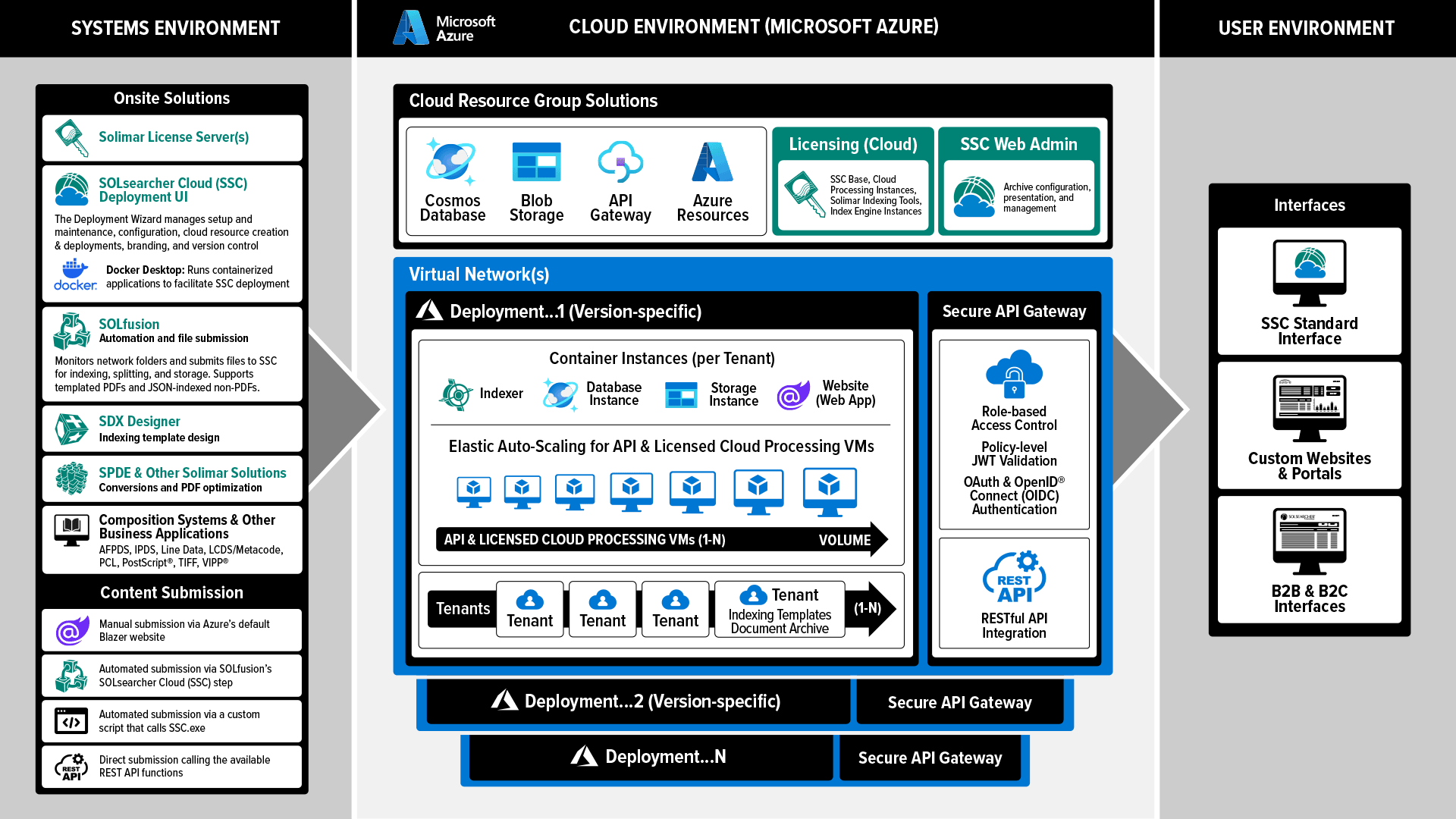
SSC leverages a modular design with each component playing a specific role to ensure the document archive is secure, scalable, and highly responsive. SSC's core technologies include:
Licensing Server (Local and Cloud):
Dedicated Azure VM that manages cloud deployment licensing. The Deployment Wizard automatically creates the Solimar License Server VM during the initial deployment. Administrators manage licenses via Remote Desktop or Azure Bastion™, while local applications like SOLfusion™ and Solimar® Indexing Tools rely on a separate, local Licensing Server.
SOLfusion & Indexing Tools:
Local workflow automation and indexing applications that watch network folders and automatically submit PDF and non-PDF files to the Azure cloud for processing. It acts as the bridge between local production environments and the SSC cloud, initiating the indexing, splitting, and storage tasks.
Cosmos DB & Blob Storage:
Azure's fault-tolerant storage and database solutions. Individual PDF records and other file formats are securely saved in Blob storage. An arbitrary indexing schema enables the indexing and archiving of any file type by submitting file and JSON pairs to SSC. This metadata is converted to JSON and stored within the Cosmos DB.
SSC Website (Cloud Client):
A browser-based HTML application that serves as the out-of-the-box portal. It allows administrators to securely manage archives and configure document lifecycles. For standard users, it serves as a branded search interface for retrieving and viewing indexed documents.
SSC Deployment UI:
An intuitive, local administrative tool that eliminates manual pre-setup by automatically configuring essential Azure resources—including Resource Groups, Virtual Networks, and Subnets. Additionally, it manages ongoing cloud deployments, server sizing, and software updates.
API & Indexing Servers:
Dynamic VMs that handle parallel file processing and results delivery. Indexing Servers parse ingested files and extract metadata, automatically scaling based on the volume of queued files. API Servers process user queries and deliver document views, scaling out dynamically based on incoming HTTP requests.
API Gateway:
An API management resource that serves as the strict, single point of entry into the SSC system. It aggregates backend service APIs and routes all client requests to the appropriate processing servers. This provides a vital layer for enforcing security policies and performing SSL termination.
Custom Portals:
Existing internal or customer-facing websites integrated with SSC. Using the REST-based API and web services, documents are delivered directly through your own corporate web portals. Users authenticate via existing network methods, and SSC works invisibly in the background to serve up specific document records and summary information.
Effortless Azure Cloud Deployment
Deploying enterprise-class software to the cloud is typically a complex, time-consuming IT project, but SSC completely changes the paradigm. With the SSC Deployment Wizard, building a secure archiving environment in the Azure cloud is fully automated and exceptionally simple.
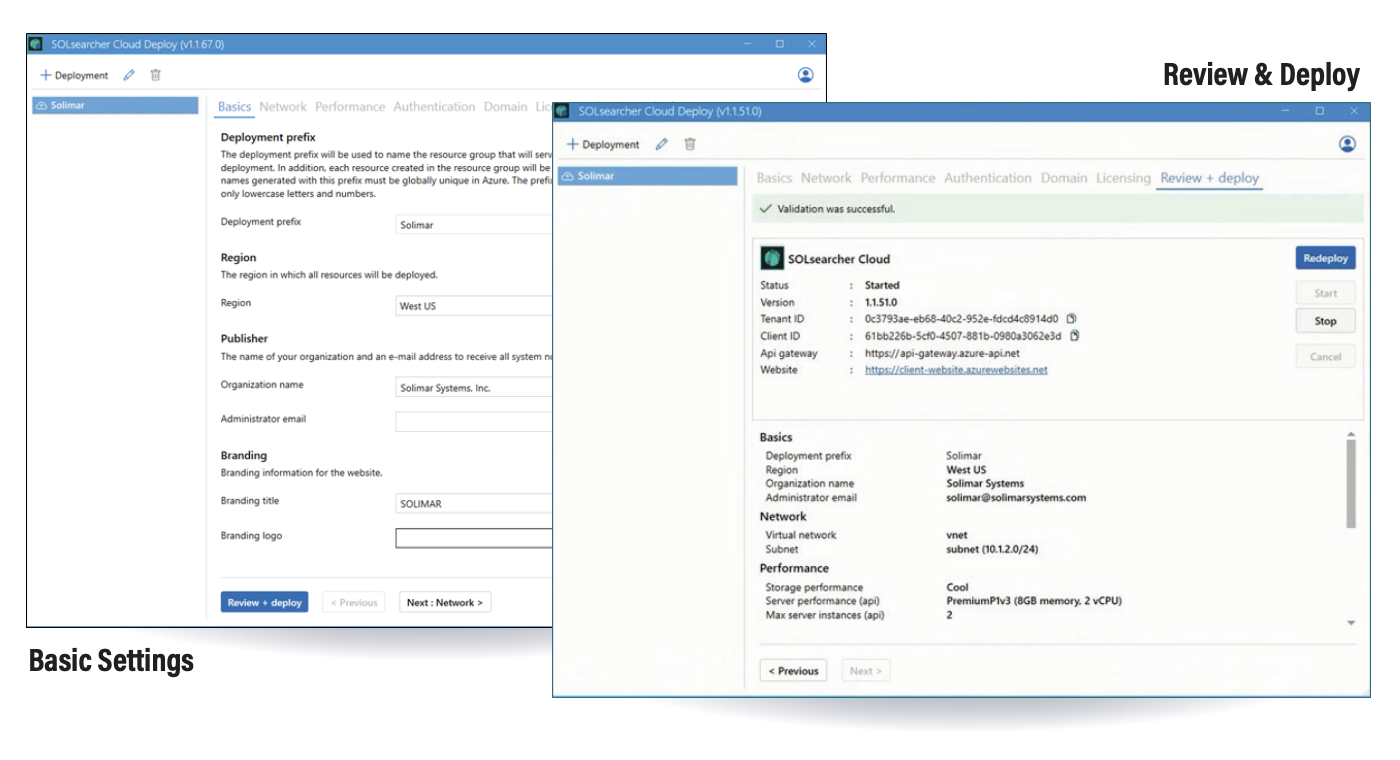
The Power of the SSC Deployment Wizard
Think of the Deployment Wizard as an automated cloud engineer. It handles the heavy lifting, allowing organizations to focus on business outcomes rather than infrastructure management.
Simplified Pre-Setup: The Deployment Wizard minimizes tedious preinstallation tasks. Simply install Docker® Desktop and configure your preferred Virtual Network and Subnet parameters. From there, the Wizard manages the creation and deployment of your cloud resources. After deployment, finalizing the setup is as easy as installing the license server software and applying the license packet.
Automated Resource Creation: The deployment application does all the necessary back-end setup automatically. Operating in the background, it intelligently builds and connects all the required Azure resources, including Resource Groups, Virtual Networks, Subnets, and API gateways.
Guided, Comprehensive Configuration: The Deployment Wizard walks you through what is needed for setup. While the defaults are fine for many users, the interface walks you through setting server performance, configuring elastic scaling, and setting up your Identity provider alongside any custom domains. Before deploying your architecture to Azure, simply select an existing Cloud License Server or have the Wizard create a new one.
Containerized Rollout: Once all options are reviewed and confirmed, the wizard deploys the fully containerized setup to Azure. An initial deployment takes about an hour to fully stand up, while subsequent software updates or redeployments take just a few minutes because the infrastructure is already in place.
Seamless Integration & Presentment
Integrating SSC into an existing CRM or customer-facing portal is straightforward. Using the REST-based API and web services, users can deliver documents within their own branded environment. Users benefit from immediate, ad hoc search capabilities, responsive paging, and the ability to view, print, or save exact replicas of their physical documents.
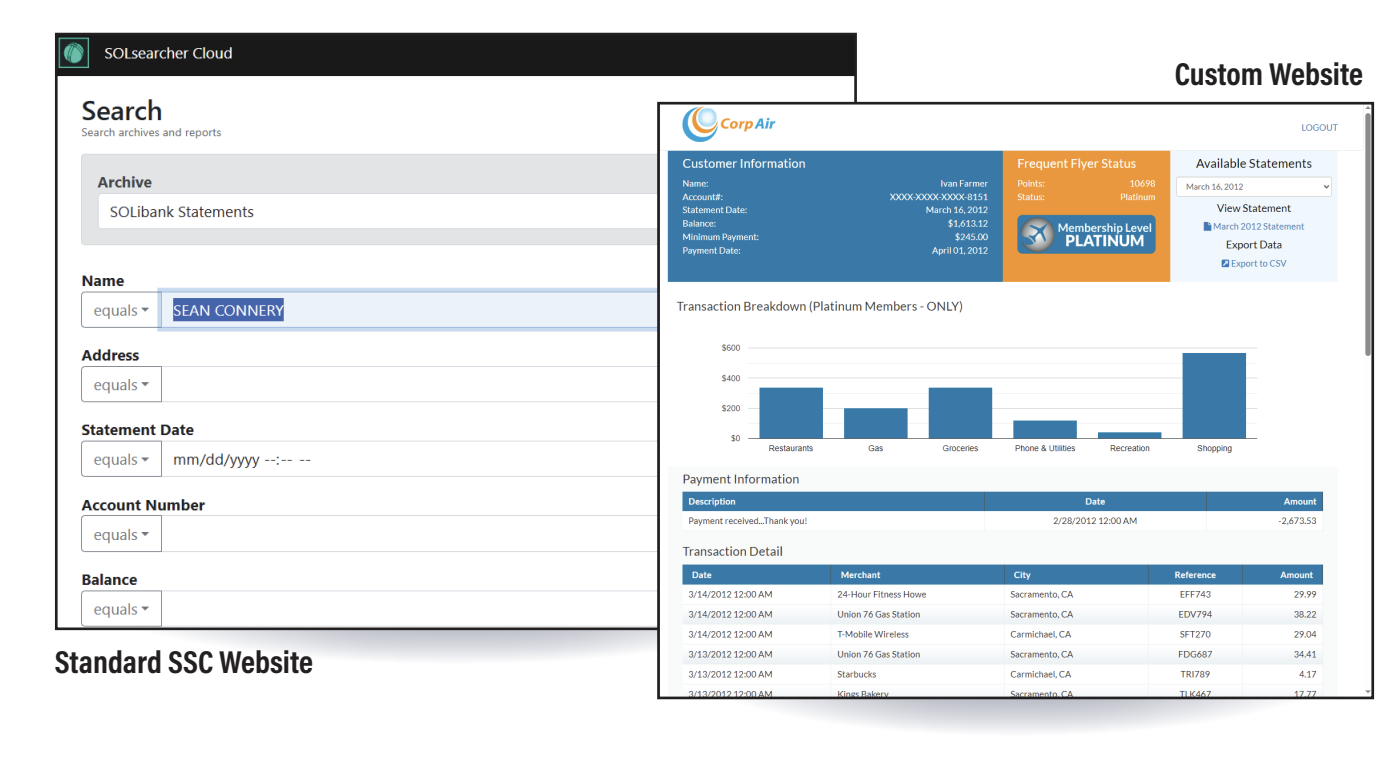
Intuitive Search & Fast Retrieval
- Exact Renditions: Users can quickly search large amounts of information to display the exact document that was printed.
- Ad Hoc Queries: Internal users, such as customer service representatives, can perform ad hoc searches to retrieve documents and find information exactly when it is needed.
- Optimized Data Transfer: To accelerate retrieval and minimize data costs, SSC splits bulk, multi-record PDFs into individual PDFs, transferring only the specific record requested.
- Flexible Document Interaction: Users can view the entire document, see a summary of the indexed content, and choose to save or print only the relevant pages.
Robust API Integrations
- Customizable Web Interface: SSC provides a customizable sample site featuring robust search capabilities. This website acts as a template that can be easily rebranded with your company’s logo.
- RESTful Architecture: How information and documents are presented is highly flexible and easily integrated with existing portals using SSC's Web Services API. It utilizes a RESTful API, allowing it to be called from any programming language.
- Invisible Background Processing: For business-to-consumer hosting, users typically log into your current corporate web portal for authentication. SSC uses their account identification to query the database and runs in the background, automatically serving up their specific documents and summary information directly to the website.
Choosing the Right Solution
When to Choose SOLsearcher Enterprise (SSE)
SSE is best suited for full-featured, on-premises environments. Choose SSE when you require:
- Complete on-premises control, IT oversight, and data sovereignty over your infrastructure.
- Integration with production print infrastructure, specifically including connection to SOLitrack.
- Advanced production capabilities, including piece-level tracking, reprints, and both push and pull delivery.
- Access to mature, premium features like Document Assembly, data export, linked fields/related reports, full-text indexing, and the ability to add notes.
- The ability to store entire jobs as single PDFs with file-level user and group rights.
When to Choose SOLsearcher Cloud (SSC)
SSC is best suited for cloud-first, scalable deployments. Choose SSC when you require:
- A resilient, cloud-based solution built on Azure that guarantees high uptime and automatic data replication.
- Streamlined deployments with automated, elastic scaling that effortlessly manages resources without requiring dedicated server maintenance.
- A modern RESTful API to easily integrate archives into custom web portals.
- Workflows that are strictly optimized for streamlined archiving and eDelivery.
- A flexible Azure-based pricing structure aligned to consumption and usage.
Discover the power of SSC's cloud-native archive & eDelivery. Connect with us to get started! solichat@solimarsystems.com