


GrackleDocs Launches Grackle PDF, an AI-Powered Tool That Makes PDF Tagging Easy
Member NewsSeptember 23, 2026
Member NewsSeptember 23, 2026

About Dave Jones, GrackleDocs Inc.
The views expressed in this article are those of the author(s) and do not reflect the policies or positions of the PDF Association.
New self-service tool simplifies PDF tagging to help increase accessibility and usability, without Adobe Acrobat or specialized desktop software
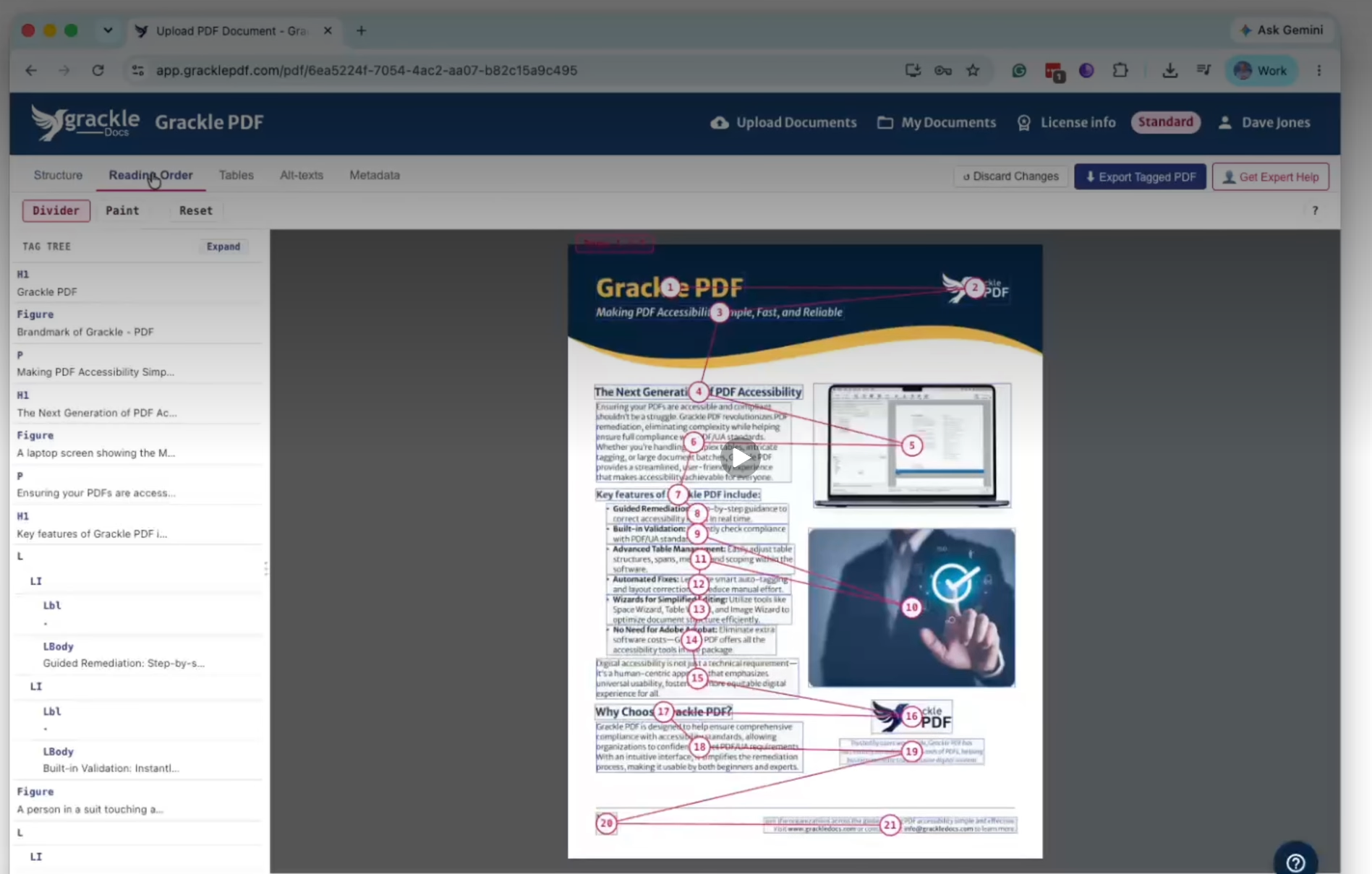
GrackleDocs, a leader in digital accessibility software, today announced the launch of Grackle PDF, a browser-based tool that makes PDF tagging easy, helping organizations increase the accessibility and usability of their PDF documents without installing Adobe Acrobat or other specialized desktop software.
Grackle PDF uses AI to automatically tag a document’s headings, tables, and images, build reading order, add alt text, and generate metadata. For many documents, that’s the whole process: users can save and export their tagged PDF right away. Anyone who wants more control can review and edit the results before finalizing.
“Improving the accessibility and usability of a PDF has always required either significant in-house expertise or an expensive outside service. Grackle PDF changes that: we’ve built the AI and the workflow to make PDF tagging easy, so any team can improve their own documents, on their own timeline,” said Jeff Mills, Co-CEO of GrackleDocs. “This is the largest go-to-market effort in GrackleDocs’ history, and it’s a direct response to what our customers have been asking for.”
The launch comes as demand for accessible digital content continues to accelerate. Awareness of digital accessibility has never been higher, and organizations increasingly want the tools to tag and improve their own documents rather than pay for an outside service to do it for them. Recent advances in AI have finally made fast, accurate self-service tagging possible, a shift Grackle PDF is built directly around.
You can learn more about Grackle PDF here.
Availability
Grackle PDF is now available for self-service signup at app.gracklepdf.com, with a free 14-day trial for anyone who wants to try it. Corporate licenses are also available, priced on application. A full license additionally provides access to the desktop version of Grackle PDF for advanced PDF tagging and control.

GrackleDocs (Grackle) is a pioneering software and services company dedicated to enhancing digital accessibility. At the heart of our mission lies a commitment to ensuring that digital content is easily accessible and navigable for everyone, regardless of any physical or cognitive disabilities. We specialize in offering innovative solutions that help…
Read more