





FAQ: AI and PDF
Basic facts
Q: Why is PDF content so important to AI systems?
Answer: PDFs are persistent electronic documents that serve as a “document of record” in shared human communication. In comparison, HTML web pages are transactional, dynamically generated or assembled, and subject to change for many reasons on the server or on the client side through scripting or user interaction.
Due to this distinction, content in PDF has higher information density and is long-context, as this HuggingFace blog post explains:
The answer lies in information density. Unlike HTML pages, which are often lightweight and boilerplate-heavy, PDFs are typically long dense documents—reports, government papers, and manuals. Content that requires significant effort to create typically correlates with higher information density.
Recent advancements in artificial intelligence include long-context capabilities, which may be required to fully understand lengthy PDF documents.
Q: Why do different AI systems understand PDFs differently?
Answer: AI systems differ in their approach to extracting information from PDF documents.
For example, many AI systems either do not include all metadata, names of bookmarks or layers, annotations, or inadequately support PDF text extraction, or always apply OCR, ignoring existing text and glyph information.
Other AI systems oversimplify the extracted content by ignoring existing semantic information (Tagged PDF) that may be present, reducing page content to a stream of plain text. Some AI systems may not respect the security permissions set by authors, such as those indicating that text and graphics should not be reused.
Q: Why is processing PDF perceived as difficult for AI?
Answer: PDF is a binary file format that is often optimized, compressed, and encrypted, whereas Markdown and HTML use a text-based syntax and therefore can be viewed in any text editor by any data scientist or AI developer. Revealing the content of PDF files requires PDF software, and analysis requires specialized PDF forensic tools. Compared to HTML, PDF’s nature can make it seem like “black magic” to data scientists and AI developers.
As an example of this complexity, consider strikethrough and underlining. In PDF, strikethrough and underlining are represented by vector graphics in page content, drawn relative to glyphs (characters). This allows PDF to support arbitrary forms of strikethrough and underlining beyond those that can be represented in other formats. However, the semantic significance of these graphics is not encoded unless the PDF is a Tagged PDF file.
Although HTML is certainly easier to view, this does not mean that all semantic information in HTML is properly tagged or retained during AI ingestion. For example, if the semantics and content of HTML <del> tags are not communicated to AI systems, the intended meaning of the content will be wrong and can lead to hallucinations. In the same way, failing to process strikethrough annotations in PDF will lead to hallucinations for the same reason.
Q: Can every PDF document be processed by AI?
Answer: No. Some PDF files may be too large (by page count or file size) and are subsequently rejected by ingestion systems. Some PDF documents are encrypted and require a password to open, and it is unlikely that AI bulk ingestion systems support this level of user interaction. Additionally, there are document categories that may contain little to no text (e.g., CAD drawings, photobooks, artwork, 3D models, etc.) and thus are not useful (except for their metadata) to text-centric AI systems.
Furthermore, authors and copyright owners of PDF documents may explicitly opt out of use in AI text and data mining (TDM) applications by including metadata in accordance with the W3C’s TDMRep protocol or the use of CAWG assertions in a Content Credential. Additionally, authors of secured documents may indicate via access permissions that text and graphics content should not be reused.
Q: Is it possible to prevent AIs from ingesting PDF files?
Answer: Yes, but only by encrypting the PDF with a user password or using proprietary DRM (digital rights management), and thus creating a barrier to human readers as well. Note that TDMRep metadata can express the reservation of rights (see this question), but does not physically prevent AI from processing PDFs.
Q: Can PDFs include semantic information that AI can use?
Answer: Yes, Tagged PDF documents include logical reading order, natural language indicators, and other rich semantic information (such as table structure and alt-text for images). Tagged PDF represents an unpaginated logical structure of the document content, completely avoiding the need to understand pagination artifacts. Tagged PDF files can be generated by all modern office suites, ensuring that reliable preservation of both application-level semantics and appearance. Most browsers can now also export Tagged PDF directly from HTML, preserving identical semantics.
Q: Can AI process redacted PDF documents?
Answer: Yes. A correctly redacted PDF document is a valid PDF, just like any other PDF document, except that certain information is no longer present. This can mean that sentences are no longer grammatically correct, or that the remaining text makes no sense, or that Document Layout Analysis or OCR processing is confused by the redaction “black boxes”. These factors can amplify AI hallucinations.
Note that a PDF document containing redaction annotations is an artifact of an incomplete redaction workflow. Redaction annotations indicate content intended for redaction, but that has not yet been purged. Thus, AI systems that process PDF documents with redaction annotations may ingest sensitive or personally-identifiable information (PII).

Q: Why is processing tabular information in PDF files so difficult?
Answer: Unlike HTML, PDF does not natively define tables in its graphical model. However, PDF’s semantic model, defined by Tagged PDF, defines table semantics that closely align with HTML. PDF table semantics are more complex than HTML because PDF tables can span page breaks, requiring an understanding of repeating column headers, cell content wrapping across page breaks, page headers and footers, and other pagination-related complications.
As we mention elsewhere, AI systems should leverage Tagged PDF semantics when present to understand document structure, including tables. For untagged PDFs, AI systems may apply visual or data (non-visual) document understanding algorithms to identify and process tabular information. Of course, such processes are error-prone and computationally expensive, which is why leveraging existing table semantics, as expressed via Tagged PDF, is preferred.
Q: Can very old PDF documents be processed by AI?
Answer: Yes. PDF is, by explicit design, a backward-compatible file format.
Q: How do I process PDF documents with PII?
Answer: This question is not about PDF, as personally identifiable information (PII) can occur in any file format. See our answer regarding redaction, which is specific to PDF technology.
Q: For AI ingestion, is all PDF software equally capable?
Answer: Not all PDF software may support all PDF features, old or new, which can limit AI understanding of PDF documents that contain those features.
Q: Which is the “best” PDF software for AI ingestion?
Answer: Many PDF Association members provide solutions that support various applications of the integration of AI and PDF. Use our free “Solution Agent” service to reach out to vendors with your list of PDF processing requirements.
Preparing PDFs for AI
Q: What content should AI ingest from PDF documents?
Answer: AI engines should ingest all information from PDF documents, including page content and their semantics, names of bookmarks, names of layers, metadata, annotations, embedded files, etc. Without all these components, AI cannot fully understand the content and its semantic context.
When referring to page content, this is not just the text, but also images and graphic data that is useful in multi-modal AI systems.
Q: How do users create PDFs that can be optimally understood by AI?"
Answer: Ensure PDFs are "born digital” documents exported from the source as Tagged PDF using either PDF 1.7 or PDF 2.0. This ensures that rich application-level semantics are preserved as well as the author's preferred page appearance.
Ideally, PDF files should conform to WTPDF or PDF/UA-1 (for PDF 1.7) or PDF/UA-2 (for PDF 2.0). If the document contains math, it should definitely conform to PDF/UA-2, given the improved support for reusable, accessible math in PDF 2.0.
Publishers should consider including TDMRep metadata to indicate rights.
Q: Can very large PDF documents be processed by AI?
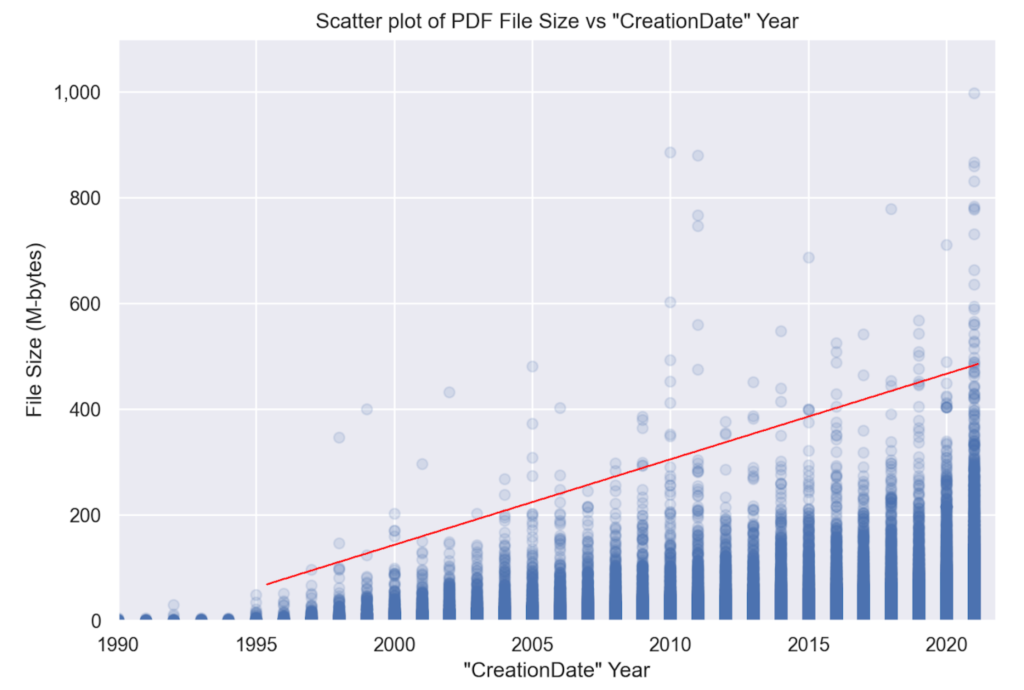
Answer: PDF is a random-access format; large PDF documents do not have to be entirely loaded into memory in order to be processed. Therefore, although PDF documents can be large in either the number of pages or file size, they can nonetheless be efficiently processed by performant PDF software. Lengthy PDF documents may be challenging for AI systems that do not support long context.
Q: How can AI know if PDF content is not to be mined?
Answer: In the fast-moving world of AI and text & data mining, a number of formats and protocols for expressing rights – including opting out of training – have been proposed. Many of these are summarized in the OpenFuture 2025 report, “A vocabulary for opting out of AI training and other forms of TDM.” For example, a PDF document’s XMP metadata can contain the W3C’s TDMRep protocol for PDF, which “expresses the reservation of rights relative to text & data mining (TDM) applied to lawfully accessible Web content, and to ease the discovery of TDM licensing policies associated with such content.”
As the standards development organization for PDF, the PDF Association continues to work alongside government, regulators, publishers, and other industry associations to ensure that methods for expressing rights (including TDM) in PDF are defined in an optimal manner.
Q: Do all PDFs need to be OCR-ed for AI?
Answer: No. Excepting PDF files created from scanned documents, most PDFs are “born digital” and contain fully extractable text. OCR is slow, costly, and imprecise, and is often completely unnecessary. OCR will only recover text content, but none of the other key pieces of information identified earlier in this FAQ. Additional post-processing after OCR is usually required to resolve errors in the OCR result. Applying OCR may additionally identify “unintentional text”, such as text in photos or images in born-digital documents or miss text that is either too small, rendered incorrectly, or is hard to see.
PDFs created from scanned workflows or that contain photos of documents – or simply photos or images that include legible text – may require OCR to be understood. However, many modern scanning workflows will already include OCR-ed text from the PDF creation process.
OCR, however, may be necessary as a reasonable fallback when the PDF’s content is intentionally or unintentionally made unretrievable, such as due to invalid Unicode values.
Q: Can AI process invalid PDF files?
Answer: It depends. Invalid PDF files include truncated or partial files (such as those stored in WARC web archives) or heavily corrupted files, and, because PDF is a binary file format, some or all of the PDF content in such files may not be processable.
PDF documents can also contain other less serious technical errors, commonly caused by bugs in PDF creation or editing applications. Good-quality PDF software will generally support error-detection and recovery algorithms for common malformations. The exact support depends on the PDF processing software used in each AI system.
One issue with recovering invalid PDF files is that different AI systems may apply different fixes, leading to different recovered information and, consequently, differences in understanding.
Alternatively, some PDFs cannot be rendered (due to the errors in images), but may still allow for text extraction. However, if an AI system uses rendering and OCR, it won’t be able to obtain anything useful.
Q: How can scanned documents be identified?
Answer: PDF does not explicitly define a mechanism to indicate whether a document is an image (scan or photo) of a hardcopy document. Because PDF supports pixel-accurate rendering and each page possibly coming from different sources, any given page consists of various combinations of content elements including, but not limited to:
- a single full-page image, or
- many abutting full-width striped images, or
- a collection of “born-digital” content.
PDF software may use various heuristics to identify such documents, including determining the area of the page covered by image data, analysing metadata properties, or detecting PDF/R files. Such PDFs often include invisible OCR-ed text objects placed atop the image(s) of the hardcopy document to enable text selection and extraction of OCR results.
Ingesting PDF files
Q: Why is PDF processing by AI often slow compared to HTML?
Answer: PDFs are commonly lengthy multi-page documents, whereas HTML pages, to avoid a negative user experience, are a single page of content, usually limited in length. Further, if an AI system uses OCR to process PDFs, the resulting (often unnecessary) overhead may limit system performance. Also, as previously noted, there are many other pieces of information present in a PDF that are not present in HTML - e.g., annotations.
Q: Why does AI commonly use document layout analysis (DLA) with PDFs?
Answer: A PDF file does not contain reliable information about the category of document - whether it be a book, an annual report, a presentation, an interactive 3D model, an interactive form, an infographic, a scanned document, an academic paper, an architectural drawing, etc. Common uses of DLA in AI systems include region classification (identifying images, tables, columns, etc.) and document classification (identifying articles, invoices, reports, etc.). In all cases, DLA proceeds by rendering PDF pages into bitmaps. However, different DLA approaches may result in different classifications.
AI systems that consume semantic information - even limited types such as lists or tables - may use DLA to determine those semantics when they are not present in the PDF itself.
Q: What if the extracted text and OCR results differ?
Answer: For born-digital documents, extracted text is normally a far better choice than OCR results for the following reasons:
- Text extraction algorithms support the ActualText information commonly used to represent the textual content of bitmap images and vector graphics, such as logos and illuminated initials.
- Text extraction supports the intended Unicode mappings for complex ligatures or fancy typefaces that can fool OCR.
- Text extraction isn’t hampered by layout factors such as content layering, proximity to other content, or other layout elements.
- Text extraction isn’t hampered by the OCR’s choice of rendering resolution, coloring, etc. For example, OCR engines that render to low resolution may struggle to resolve small text.
- Text extraction can access text in annotations and other non-page content.
OCR can only ever extract text that is clearly visible within the page, and will miss everything else.
Q: Is converting PDF to another format before AI ingestion a good strategy?
Answer: Generally, no. PDF has many features and capabilities that do not have equivalents in other formats, such as Markdown or HTML. Obviously, conversion to plain text is inevitably lossy in terms of rich information and semantics! Consider the difference between 22 and 22 if converted to plain text! And then consider that the superscript 2 could represent a footnote, an exponent, a numerator of a fraction, or several other possibilities.
Markdown can, of course, represent superscripted text (so long as the PDF-to-MD conversion supports conversion of superscripts), but what of tables with merged cells, multiline headings, digital signatures, or layers, none of which are supported by Markdown?
Although certain simple PDF documents may be equivalently expressed in Markdown or HTML without loss of information, converting all PDF documents is an unnecessary (and potentially hallucinogenic) “dumbing down” process that will reduce AI's overall understanding of PDF content.
Q: Should AI systems process PDFs page by page?
Answer: No. Unlike HTML, PDF is a paginated electronic document format. As a result, content (including sentences or even words) can be expected to break across page boundaries. Thus, isolating individual pages as separate inputs to AI will reduce overall understanding and increase the risk of hallucinations.
With that said, awareness of source page(s) is necessary for attribution scenarios, where the user needs a reference back to the source to validate whether the AI’s answer is grounded in truth.
Q: Should AI ignore PDF annotations?
Answer: No. PDF annotations include content that’s often critical to a correct understanding of a document and its context. This includes digital signatures, which can be validated to verify the trustworthiness of information; embedded file attachments; multimedia (e.g., audio and video); review and markup annotations, which indicate additional content or page content intended for insertion, replacement, or deletion.
It is important, however, that AI systems understand the semantics of the annotations and do not treat them the same as content.
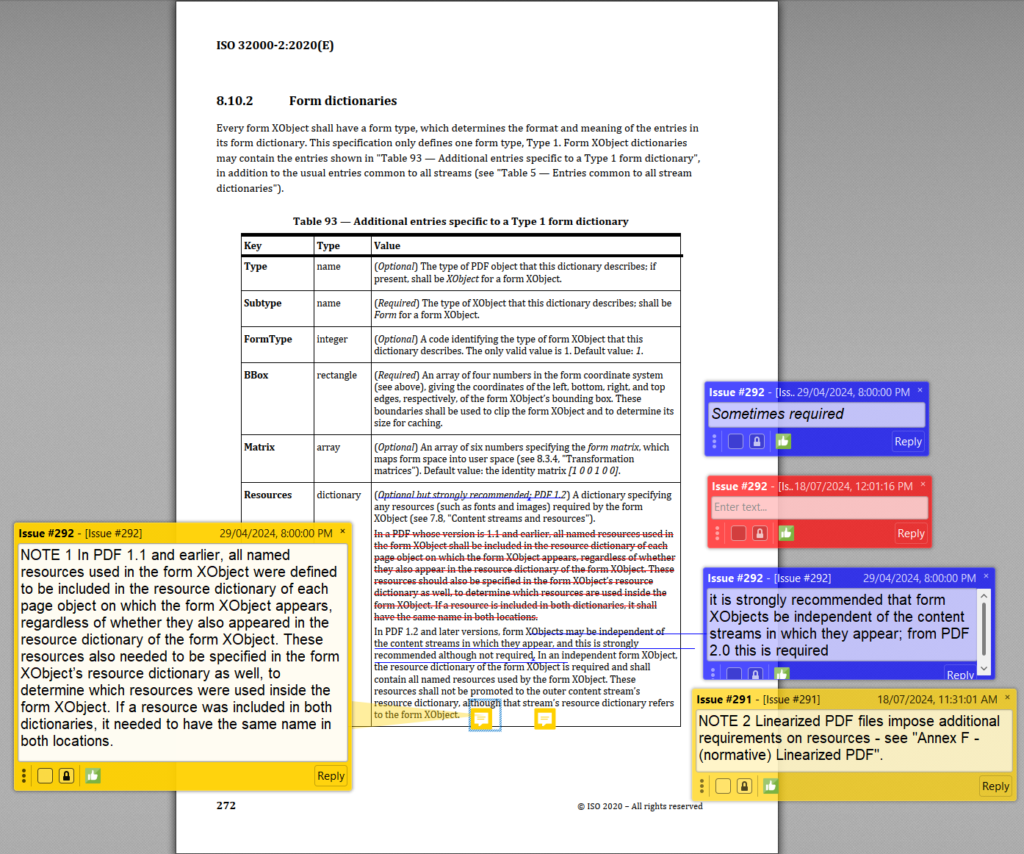
Note that a PDF document containing redaction annotations is an artifact of an incomplete redaction workflow. Redaction annotations indicate content intended to be redacted but has not yet been purged. Thus, AI systems that process PDF documents with redaction annotations may ingest sensitive or personally-identifiable information (PII). See our answer on redaction.
Q: Should AI ignore PDF metadata?
Answer: No. PDF metadata, including both legacy Document Information dictionary entries and modern XML-based XMP metadata, can influence AI’s understanding of PDF documents - and potentially reduce processing costs. For example:
- Document-level XMP metadata can reveal the document’s title or author
- Object-level XMP metadata can reveal the origin or provenance of an image
- A PDF/UA conformance claim (which exists only in XMP metadata) should be leveraged by AI to inform its understanding of the author’s intent as expressed in the semantic structure of the file’s content (i.e., the Tagged PDF) rather than attempting to infer reading order and semantic understanding.
PDF’s rich metadata, including title, author, subject, and keyword information, along with creation and modification dates (which are entirely separate from the host file system) and the tools used to create and/or process the PDF, can provide additional context to AI systems. This same information may not exist elsewhere in the page content.

Furthermore, XMP metadata is one place where copyright owners can state their TDM (Text and Data Mining) preferences for AI ingestion, if they are using the W3C’s TDMRep protocol.
Q: How should PDF feature X be best handled by AI?
Answer: PDF offers many advanced features and capabilities to support a wide range of document use cases. Generally, PDF does not constrain which features can occur in documents. As a result, PDF software used in AI ingestion systems must support all PDF features so as to be capable of ingesting the full gamut of PDF documents. This includes layers (optional content), collections, annotations, vertical and right-to-left writing, multimedia, 3D content, interactive forms, math, embedded files, JavaScript, and many others.
Tailored AI systems may be configured to ignore certain PDF features, however if not managed carefully, this may lead to reduced understanding and increased hallucinations.
Q: How should document feature X be best handled by AI?
Answer: As a general-purpose document format, PDF does not define how content is represented. PDF has many advanced capabilities, but PDF creation applications can choose not to use these capabilities and represent content in other, less optimal ways. For example, applications may reduce information to rendered images, making information extraction far more difficult (e.g., rendering mathematical equations as bitmaps rather than providing MathML).
As AI ingestion becomes more important, PDF creation applications should be encouraged to adopt PDF’s latest features and appropriate capabilities to enable understanding by downstream AI systems. This improvement not only supports AI but also often improves accessibility and content reuse!
Q: What about malicious PDF files?
Answer: Like other formats, PDFs can contain malicious content such as executable payloads, maliciously crafted data targeting specific implementations, links to malicious websites, etc. PDF content may also be fraudulent or contain phishing information.
Furthermore, PDF content, like all other forms of input, may also be used in AI poisoning and evasion attacks.
AI ingestion systems should use appropriate cybersecurity practices to protect themselves. The validation of PDF digital signatures (when present) may help protect AI systems against malicious content.
Do you have another question?
Please get in touch with us if you’d like us to answer any additional questions.