




FormVu Now Lets Users Sign Converted Forms Right in the Browser
Member NewsMay 18, 2026

Member NewsMay 18, 2026

About Nadir Shah, IDRsolutions
The views expressed in this article are those of the author(s) and do not reflect the policies or positions of the PDF Association.
PDF forms are deceptively complex under the hood. What looks like a straightforward set of fields, text boxes, checkboxes, and dropdowns sits on top of a specification that handles each field type very differently. Signature fields are the most involved of the lot.
How PDFs Handle Digital Signatures
The PDF spec treats signing as a multi-layered process involving cryptographic algorithms, certificate chains, and document-state locking that ties the signature to the exact byte-state of the file at the moment of signing.
How HTML Handles Digital Signatures
That complexity is precisely why FormVu, which converts PDF forms into fully interactive HTML5 forms, historically couldn’t do anything useful with signature fields. The mechanism that makes a PDF signature “work” in Acrobat has no natural equivalent once you’ve crossed into HTML.
JPedal (our PDF rendering engine) handles document signing in the PDF world, but that approach doesn’t translate to a browser-based HTML form output.
What Changed in the latest FormVu Release?
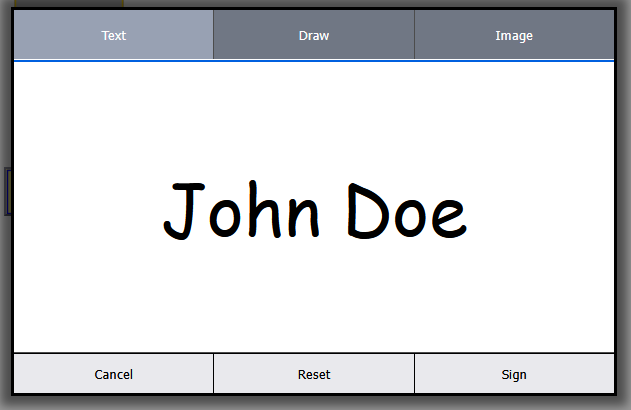
- Type: Enter a name, rendered in a signature-style font, into the field.
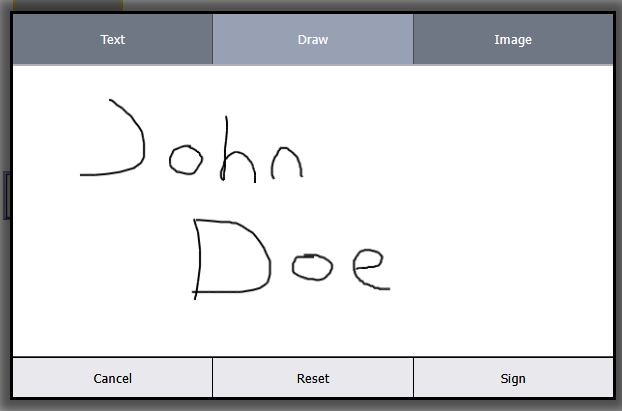
- Draw: Use a mouse or touchscreen to draw a freehand signature directly in the dialogue.
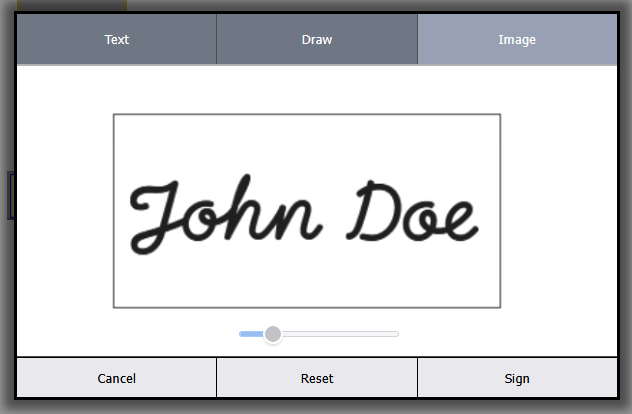
- Upload: Provide an image file of an existing signature.
Various Signature Formats Supported
Why It Works for This Use Case
The reason this feature works well in FormVu’s world is the same reason it wouldn’t work as a standalone PDF-signing tool: context. A form converted to HTML5 is no longer a PDF. It’s a web document that looks like the original form. Users filling it out in a browser are working in a web context, and a web-native signature capture is exactly what that context calls for.
The Integration Picture
The signing UI is handled by FormVu’s output JavaScript with nothing to build on the front end. Once signed, the signature displays immediately in the HTML form. When the form is saved as a PDF, the signature is output as an appearance image embedded in the file.
Touchscreen input works in the draw mode without any additional configuration, which is useful for tablet-based use cases, field data collection, and onsite inspections.
FormVu 2026.05 is available now. The full documentation for useFormVuSigning can be found on FormVu support docs.

Founded in 1999, IDRsolutions is a small, dynamic UK based company which specialises in software to solve PDF problems for other developers in their own applications. We develop JPedal (convert PDF to image or view PDF files in Java Applications), BuildVu (view or parse PDF as HTML5/SVG), FormVu (convert PDF…
Read more