





PDF accessibility in R reporting workflows

About Joseph Barbier
The opinions expressed are those of the author.

About David Keyes
The opinions expressed are those of the author.
ArticleJuly 30, 2026
ArticleJuly 30, 2026
About Joseph Barbier
The opinions expressed are those of the author.
About David Keyes
The opinions expressed are those of the author.
The views expressed in this article are those of the author(s) and do not reflect the policies or positions of the PDF Association.
Accessible PDF reporting is a practical requirement in many data science and research settings. Statistical analysis, scientific reporting, and policy evaluation are often communicated through PDFs because the format is stable, portable, and widely accepted in formal review processes. At the same time, visual quality alone is not enough. A PDF can look correct and still fail accessibility requirements for people using screen readers and other assistive technologies.
R is used heavily in research, public policy, biostatistics, and applied analytics. In these environments, final deliverables are often produced from reproducible data sources, then distributed as PDFs to clients, journals, grant reviewers, leadership teams, or regulators.
In the R ecosystem, accessibility issues appear regularly because many teams generate documents programmatically and at scale. When accessibility checks are handled manually at the end of a project, they are costly to fix. The more realistic approach is to integrate PDF validation inside the same workflow used to produce them.
PDF output in the R data science and research ecosystem
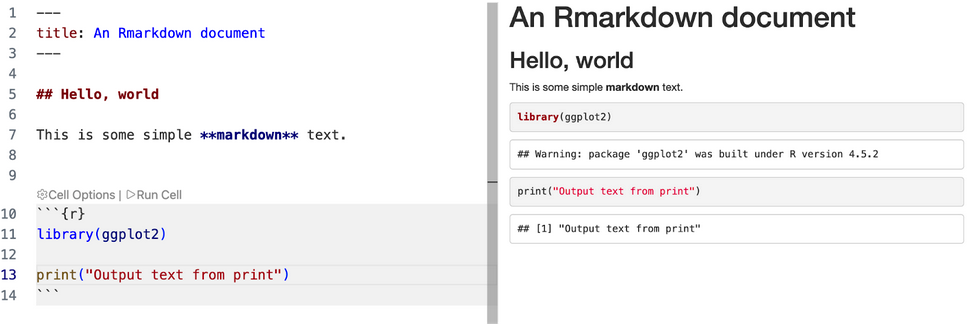
Historically, R-Markdown has been the go-to report authoring syntax for R users because it seamlessly lets authors combine the simplicity of Markdown with chunks of R code in a single data-driven document that can then be exported to multiple formats, such as PDF, HTML, or Word, utilizing third-party PDF generation engines such as LaTeX or Typst.
Now, Quarto is considered a modern and more powerful alternative. It’s developed by the same community and is compatible with other dynamic data environments such as Python and Jupyter notebooks, Julia, and Observable. Today, Quarto offers more features than R-Markdown, including an easier way to create extensions, greater control over the output document, additional output formats, and additional generation engines.
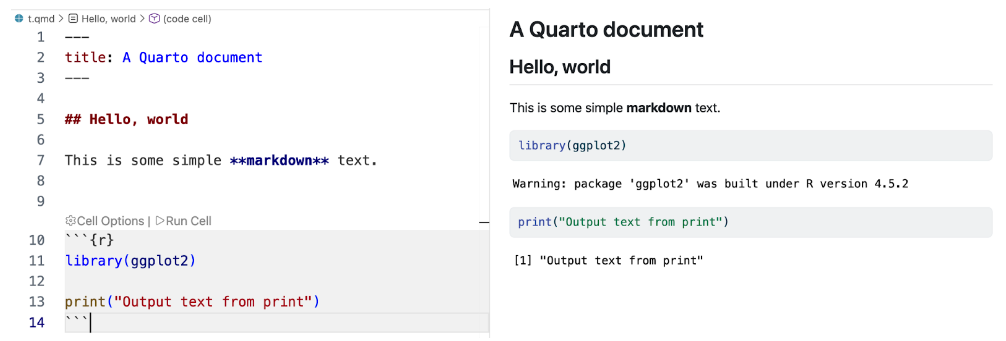
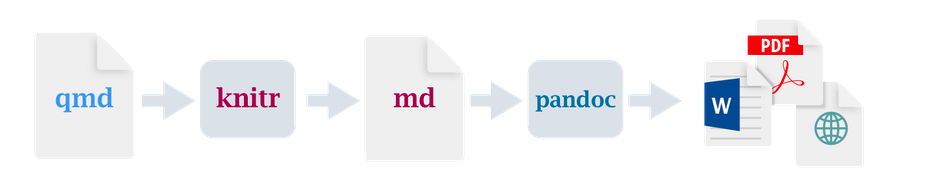
The main problem those tools solve is making the content of the report (written markdown) and the computations (code) in the same place, which simplifies reproducibility and reduces manual work. They also let you write once and then export to multiple formats.
Each path can produce high-quality documents. However, accessibility conformance depends on metadata, structure tagging, heading hierarchy, table semantics, alternative text, and other authoring details. These details are not always visible in authoring tools, so teams need an explicit validation step that can be done from within the R environment.
The operational gap
Standards and validators already exist outside the R ecosystem. PDF/UA and related specifications clearly define requirements, and veraPDF provides detailed machine-level validation.
The gap is operational rather than conceptual, but data analysts and researchers are not accessibility or PDF specialists. They need a simple process that answers concrete questions in a reproducible way in their primary environment:
- Does this file conform to the selected profile, such as PDF/UA-1 or PDF/UA-2?
- Which rules failed?
- How frequently did each issue occur?
- What should be fixed in the source before the next render?
Without a workflow-friendly interface, these checks are often postponed until late review stages. The rendering of an R-markdown or Quarto document with accessibility issues will not trigger any warning messages and will leave authors fully responsible for ensuring the accessibility of the document. They will have to manually check accessibility separately from the document creation process, using a dedicated tool and often involving numerous manual steps.
Project origin in applied client work
The project was initiated by Joseph Barbier and David Keyes during client reporting work. They identified a recurring issue: PDFs delivered to clients were not always fully accessible, even when generated through modern reproducible workflows. The immediate need was a straightforward way to consistently measure accessibility, document failures clearly, and support remediation in source files rather than post-process final PDFs.
That practical requirement shaped the package design: minimal validation commands, structured summaries for quick diagnosis, and reports that connect technical rules to actionable fixes.
From a standards adoption perspective, this is important. Many accessibility failures are workflow failures: checks happen too late, are hard to interpret, or are not repeated consistently. Embedding validation in the authoring pipeline improves the likelihood that conformance is measured early and maintained over time.
Integrated PDF validation within R
pdfcheck is an R package that exposes veraPDF validation inside R workflows. It is not a separate standards framework and does not replace manual accessibility review. Its role is to make formal machine-level validation easier to run, inspect, and repeat during document production from within the R environment. pdfcheck makes this possible by wrapping verapdf in an R package.
The package provides three practical entry points:
- `is_pdf_compliant()` for a direct pass or fail result.
- `accessibility_summary()` for a compact terminal summary.
- `accessibility_report()` for an HTML report with issue-level detail.
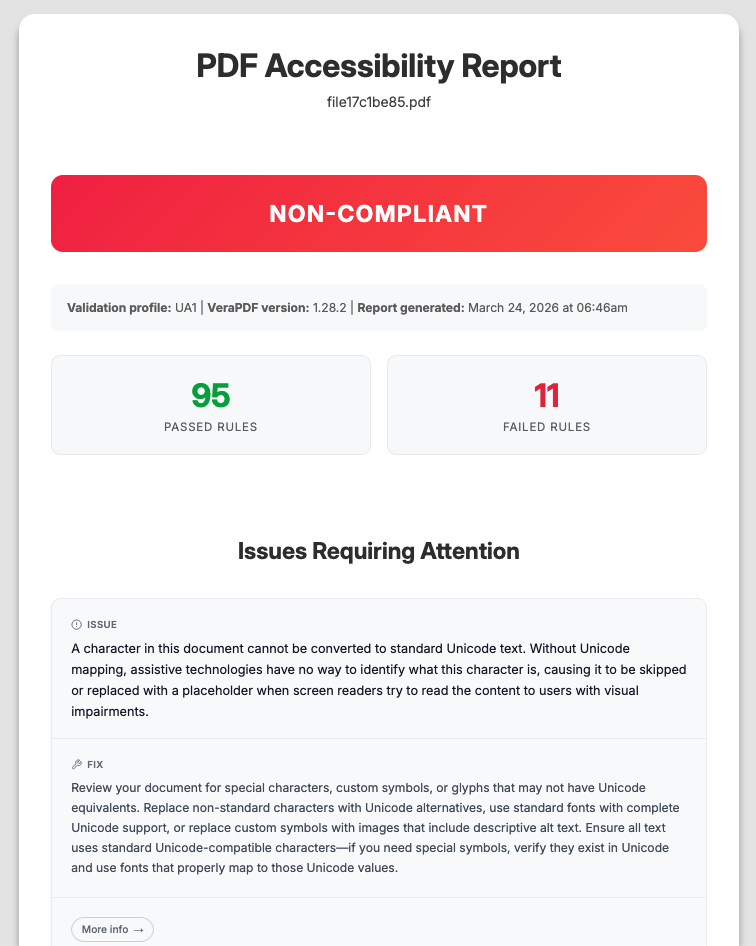
Example usage
```r
pak::pkg_install("rfortherestofus/pdfcheck")
pdfcheck::install_verapdf()

pdfcheck::is_pdf_compliant("report.pdf", profile = "ua1")

pdfcheck::accessibility_report(
 "report.pdf",
 output_file = "report-accessibility.html",
 profile = "ua1"
)
```
pdfcheck exposes all validation profiles supported by veraPDF, including PDF UA-1 (ISO 14289-1), PDF UA-2, and several PDF/A (ISO 19005) variants.
