





Understanding and fixing an issue in AI-generated print PDFs
Member NewsSeptember 18, 2026

Member NewsSeptember 18, 2026

About Dietrich von Seggern, callas software GmbH
The views expressed in this article are those of the author(s) and do not reflect the policies or positions of the PDF Association.
ChatGPT now adds Content Credentials to generated PDFs, but a structural error can make those files incompatible with PDF/X and disrupt prepress workflows. Dietrich von Seggern, Managing Director of callas software, explains what goes wrong and how pdfToolbox can help create a production-ready copy while preserving the original provenance data.
When AI fails to make better PDFs
AI tools can do many things, including creating PDF layouts. Whether this is always a good idea is a different question – design capabilities are still limited. But that is not what anyone asks us at callas software anyway, what we are asked is how to process these files in print production.
Over the last two weeks, we have received several support inquiries from printers running into problems with PDF files created by AI. In every case, the technical issue was the same.
Interestingly, the problem is caused by something the AI solution actually deserves credit for: adding Content Credentials to the PDF. ChatGPT recently started doing this, but unfortunately in a technically flawed way that is incompatible with PDF/X. Not ideal for a layout created for print.
What are Content Credentials?
Content Credentials are based on the C2PA standard and provide information about the origin and history of digital content. This information travels with the content itself and can indicate which tools were involved in creating or modifying it.
This is particularly useful for AI-generated and AI-modified content. Instead of trying to determine afterwards whether something was created by AI, provenance information can be attached when the content is created or edited.
AI tools are already using Content Credentials for images and video. Their use in PDF files has been much less common, so ChatGPT adding them to generated PDFs is, in principle, a welcome development.
The problem is not the presence of Content Credentials, but how they are embedded in the PDF.
How are Content Credentials stored in PDF?
To understand the problem, we need to look briefly at PDF structure.
PDF uses a File Specification to describe a file associated with the document. That file can either be embedded in the PDF or referenced as an external file.
If the file is embedded, its data is stored in a stream. A File Specification for an embedded file contains an EF dictionary, with an F entry pointing to the stream containing the file.
Simplified, the structure looks like this:
File Specification
..../EF
......../F.-> embedded file stream
So far, so good.
A stream can either contain its own data or refer to an external file. An external file reference is indicated by an F entry in the stream dictionary. If such an entry is present, the data contained in the stream is ignored and the processor expects to find the data in the external file.
And that is where the problem begins.
One F too many
The Content Credentials generated by ChatGPT are correctly represented as an associated embedded file. But the embedded file stream itself contains another /F entry:
File Specification
.../EF
......../F.-> embedded file stream
...................Content Credentials
............../F.-> Indication for an external file reference – embedded stream data is ignored
The first /F is exactly where it should be. It points from the EF dictionary to the embedded file stream.
The second /F, the one inside the stream dictionary, is the problem. At this location, it tells the PDF processor that the stream data comes from an external file.
In other words, the PDF contains the Content Credentials, while at the same time instructing the processor to ignore them and look for an external file instead.
Deleting this additional /F entry resolves the issue and makes the Content Credentials usable again. Unfortunately, existing prepress workflows are normally not prepared to make this kind of correction.
Why does this matter in print production: Issues and resolutions
There are two practical consequences.
1. Processing embedded files can fail
A workflow may inspect or extract embedded files to determine what additional information is contained in a PDF.
In pdfToolbox Checks, the “Embedded files” option applies the respective check to embedded files as well. With affected PDFs, this can fail because the processor encounters the contradictory stream information.
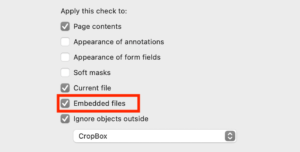
For affected files, make sure this option is switched off for all Checks that do not need to process embedded files. The Content Credentials remain in the PDF, but the prepress workflow ignores them.
For many workflows, this is the least invasive solution.
2. The structure is not allowed in PDF/X
The second issue is more fundamental. PDF/X does not allow external file references in stream dictionaries.
It explicitly states:
“The F key shall not be used in a stream dictionary.”
The additional /F entry therefore cannot remain in a PDF/X file.
A PDF/X workflow must address the issue even if the Content Credentials themselves do not otherwise interfere with production.
Fixing the issue in pdfToolbox 17.1
pdfToolbox 17.1, scheduled for end of this month, will automatically correct this structural problem whenever a Fixup is applied to the PDF. We have decided to add this case to the syntax issues that pdfToolbox automatically repairs, because there is no meaningful situation in which keeping the contradictory /F entry makes sense.
This means that applying any Fixup will remove the incorrect /F entry while keeping the embedded Content Credentials intact.
Removing the issue in pdfToolbox 17.0
pdfToolbox contains the predefined Fixup “Discard all embedded files”. Applying it removes the embedded files and therefore also eliminates the problematic structure.
There is, however, an important caveat.
Normally, Content Credentials should not be removed. Their purpose is to preserve provenance information, and deleting them without a good reason would generally be the wrong approach.
For print production, however, a practical solution is to keep the original PDF unchanged and create a separate production PDF without embedded files.
This preserves the original file, including its Content Credentials, while allowing a clean PDF/X production file to be created.
You can download a variant of the predefined Profile “Convert to PDF/X-4 (ISO Coated v2 (ECI))” that also removes all embedded files.
This should only be considered a temporary solution. Updating to pdfToolbox 17.1 is preferable, as it corrects the structural problem while keeping the Content Credentials.
Content Credentials are a solution not a problem
As AI-generated and AI-modified content becomes more common, reliable provenance information is becoming increasingly valuable. Having AI tools add Content Credentials to generated PDFs is therefore a development that we very much welcome.
The current issue is a technical implementation problem in the PDF structure, not a problem with Content Credentials or C2PA itself.
We do not know when Open AI will fix the issue, until then print workflows receiving affected files have essentially three options:
- Use pdfToolbox 17.1 and apply at least one Fixup (it does not matter which one)
- Keep the Content Credentials and make sure pdfToolbox does not attempt to process the embedded file.
- Create a dedicated production copy without embedded files, while retaining the original PDF with its Content Credentials for provenance purposes.

callas software was founded in 1995 and has focused on making PDF files usable in production environments from the start. While PDF was designed as a flexible and open format, using it reliably in production – where standardization matters – often proves challenging. callas develops technology to identify PDF files…
Read more