





The Power Of Tags: Making PDFs Accessible And Compliant
ArticleJuly 16, 2026
ArticleJuly 16, 2026

About Vijayshree Vethantham, Continual Engine
The views expressed in this article are those of the author(s) and do not reflect the policies or positions of the PDF Association.
Introduction
Have you ever tried reading a PDF that felt confusing or hard to navigate? For users with visual or cognitive impairments, this experience can be even more frustrating. That’s why PDF accessibility matters. Whether you’re generating reports, brochures, forms, or manuals, making your content accessible helps you reach a wider audience—including individuals with visual, cognitive, or mobility impairments.
An accessible PDF uses digital tags to define the structure and function of each element, like headings, images, and lists so that assistive technologies can interpret them accurately. These tags in PDF accessibility help organize content through features like alternative text, clear heading levels, and proper color contrast, making the file easier to read and navigate for everyone. So, the role of tags for PDF accessibility is significant, and tagged PDFs are easier for everyone to read and navigate.
What Is Tagged PDF?
A tagged PDF is a type of PDF file that includes an invisible structure—known as tags—that defines how the content should be interpreted by assistive technologies like screen readers. These tags describe the document’s structure, reading order, and content elements, such as headings, paragraphs, lists, and tables.
Unlike a regular PDF, which focuses solely on how content looks visually, a tagged PDF carries meaning and logic behind the scenes. It bridges the gap between your content and users who rely on tools to access that content in non-visual ways.
Why Are Tags Important For PDF Accessibility?
Adding tags to your PDF isn’t just a technical step; it’s a critical part of creating an inclusive document. Here’s how tags support PDF accessibility and remediation and why they’re essential for both compliance and usability.
Enables Assistive Technology Compatibility
Tagging a PDF gives it a clear structure, allowing assistive technologies like screen readers and Braille displays to interpret and present the content accurately. By using tags in PDF accessibility to define elements such as headings, lists, and tables, you make it easier for users with visual impairments to navigate and access key information.
Defines Logical Reading Order
One of the main roles of tags in PDF accessibility is to ensure content is read in a meaningful sequence. Tags establish a logical reading flow, regardless of how the content is visually arranged. This is especially important for multi-column layouts, tables, and documents with images or sidebars.
Supports Navigation and Interaction
With proper tagging, users can navigate through your document using keyboard shortcuts, screen reader commands, or other input tools. Tags make it easier to skip to specific sections, jump between headings, and locate links, enhancing usability for all.
Meets Legal and Accessibility Standards
Many accessibility laws and guidelines—such as Section 508, WCAG, and PDF/UA—require that digital documents be accessible. Tags are a key requirement to meet these accessibility standards, and failing to include them may expose you or your organization to legal risks. Accessibility standards also improve the overall quality and clarity of your documents for everyone.
Enhances User Experience for All
While PDF tagging is essential for accessibility, it also benefits every reader. A well-structured tagged PDF is easier to convert into formats like HTML or ePub, improves searchability, and adjusts better on mobile screens. The importance of tags for PDF accessibility goes beyond compliance—it enhances the experience for all users.
How Tags Are Used In PDFs?
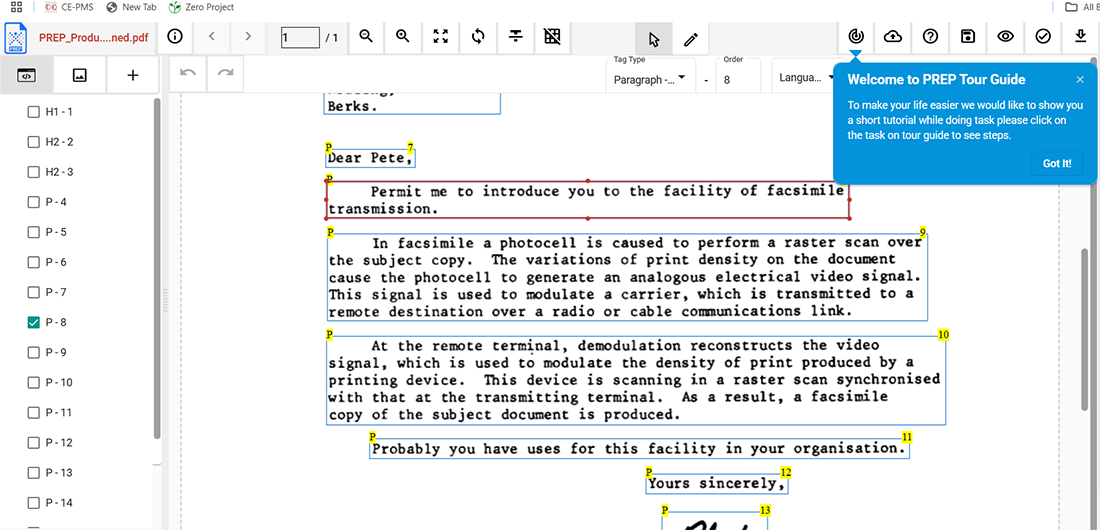
When you apply tags to your PDF, you’re basically building a structure behind the scenes that helps define how each element of content functions. Think of it as adding labels and instructions for assistive technologies.
Every section of your PDF—headings, paragraphs, bullet points, tables, and even images—is enclosed in a specific tag that tells screen readers what that content is and how it relates to the rest of the document.
For example:
- Heading tags like <H1>, <H2>, etc., show the hierarchy and help users navigate sections easily.
- Paragraph tags (<P>) identify blocks of regular text.
- List and table tags such as <L>, <LI>, <Table>, <TR>, and <TD> break complex content into understandable chunks.
- Image tags are paired with alternative text (alt text) to describe visuals to users who can’t see them.
All of these tags are arranged in a tag tree, which is a logical structure separate from the visual layout. This enables screen readers to deliver content in a meaningful and ordered way. It also allows users to explore your PDF with keyboard commands or voice inputs instead of relying on a mouse or touchpad.
Conclusion
Tags in PDF accessibility form the foundation of a well-structured, inclusive document. They ensure your content is readable and navigable—especially for users who depend on assistive technologies. By applying proper tagging, you not only support legal compliance but also improve usability for all.
Whether you’re building new files or performing PDF accessibility and remediation, always aim for a tagged PDF. This simple step makes your content inclusive, professional, and future-ready.
